How to change your location on Android with ExpressVPN


ExpressVPN lets you change the IP-based location that websites and services see on Android. When you connect to a VPN server, they’ll see your chosen VPN location instead of the location associated with your regular IP address.
How to choose a VPN location on Android with ExpressVPN
With ExpressVPN installed on your Android phone:
- Open the ExpressVPN app and tap Change next to Fastest Location / Selected Location.
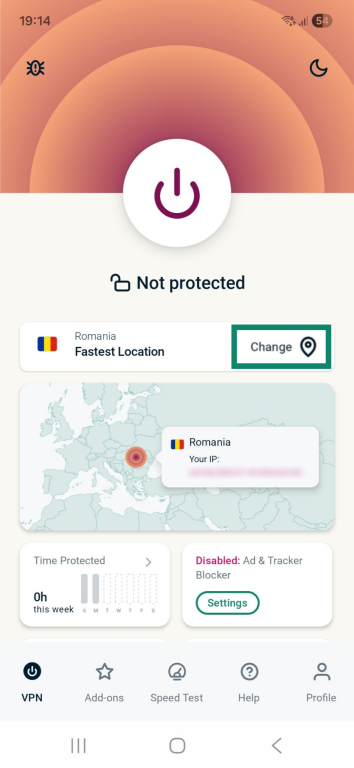
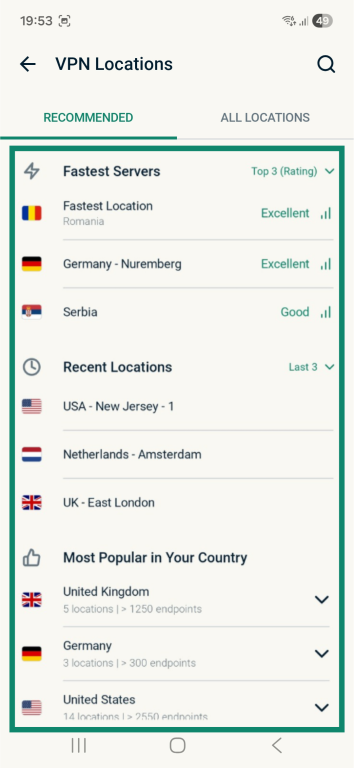
- Select a VPN server to connect to.
- Wait for the VPN to connect. Once it has, open your browser or another app. You can now browse the internet as usual using the IP address associated with your chosen VPN location.
Why use ExpressVPN to change your IP location on Android?
ExpressVPN offers server locations in 113 countries, so you can choose the IP location you want. If you don’t need a specific location, Fastest Location recommends a server based on factors including speed, latency, and distance. This gives you the flexibility to choose a particular location if you know where you want to connect or prioritize connection performance if location doesn’t matter.
ExpressVPN’s Lightway protocol also helps the VPN reconnect quickly when your Android device switches between Wi-Fi and mobile data. This makes it easier to keep using your chosen VPN location as you move between networks.
Finally, split tunneling lets you control which apps use your VPN location. You can choose which apps connect through ExpressVPN and which use your regular internet connection. This is useful if only certain apps need a different IP location. For example, you could route your browser through the VPN while keeping a banking app on your normal connection.
Change your Android IP location with ExpressVPN
Why does Android sometimes show your real location with ExpressVPN connected?
An app or website can still show your real location when you’re connected to ExpressVPN because the VPN changes your public IP address and its associated IP-based location, but not other location signals Android or individual services may use.
These signals can include:
- GPS and device sensors: ExpressVPN doesn’t change the location Android estimates from your phone’s GPS receiver and other sensors. Apps with location permission may receive this physical-location data through Android’s location services, even while their internet traffic uses an ExpressVPN server.
- Wi-Fi and Bluetooth scanning: ExpressVPN doesn’t change the nearby Wi-Fi access points or Bluetooth devices Android can use to help estimate your physical location. An app using Android’s location services may therefore receive a location that differs from your VPN server location.
- Cellular network information: ExpressVPN changes the IP address used by traffic routed through the VPN, but it doesn’t change the cellular-network signals Android may use when estimating your device’s physical location.
- Stored app or account information: Changing your ExpressVPN server location doesn’t change location information already stored by a browser, in cookies or cached data, or in account settings. A service may continue showing that stored location instead of the location associated with your VPN IP address.
Is it legal to change your IP location on Android with ExpressVPN?
Changing your IP location with ExpressVPN is legal in most parts of the world where using a VPN is also legal. However, applicable laws and regulations are different across jurisdictions, so each user is responsible for how they use VPNs. The terms of service of individual apps and websites may also restrict or regulate VPN use.
FAQ
Will ExpressVPN hide my GPS location?
No, ExpressVPN can’t hide your GPS location. It changes the public IP address and its associated location, but it doesn’t change the Android device’s GPS coordinates. So, apps with location permission may continue to determine your device’s physical location through GPS data, even with ExpressVPN connected.
Why does Google Maps still show my real location when ExpressVPN is connected?
Google Maps uses Android’s device location services, which can use GPS, Wi-Fi, and cellular signals, instead of relying on your public IP address. This doesn’t necessarily mean there’s a problem with your ExpressVPN connection. You can use an IP checker to confirm that your VPN IP address has changed.
Can I set different locations for different apps?
No, you can’t set different locations for different apps on ExpressVPN. The split tunneling feature lets you select which apps use the VPN connection and which connect outside it, but it won’t allow different apps to use different servers at the same time.
Can ExpressVPN change my Google Play country?
No. Connecting to an ExpressVPN server changes your IP-based location, but it doesn’t change the country set for your Google Play account. Google has separate requirements for changing your Google Play country, including being in the new country and having a payment method from that country.
Can changing ExpressVPN locations affect internet speed?
Yes, connecting to ExpressVPN can affect internet speed and latency. The impact depends on factors such as the server’s distance, network conditions, the VPN protocol, and your underlying connection. If you don’t need a specific location, Fastest Location can help you choose one based on connection performance.