Expressvpn Glossary
Data migration
What is data migration?
Data migration is the process of transferring data from one system, database, or storage environment to another. Organizations typically perform data migration when upgrading infrastructure, changing applications, or moving to cloud-based platforms to ensure existing data remains usable and accurate in the new environment.
How does data migration work?
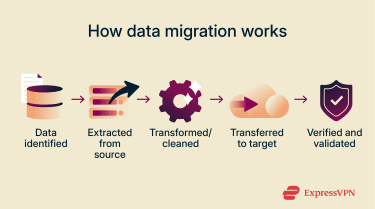
Most migrations follow an Extract, Transform, Load (ETL) or Extract, Load, Transform (ELT) approach, depending on the system and scale of the project. Here are the main steps for migrating data:
- Extraction: First, the data to be moved is identified and copied from the source system, which could be an old database, server, or storage device.
- Transformation: Next, the data is cleaned and restructured so that it’s compatible with the new system. That might mean fixing errors, removing duplicates, or changing the format so the new system can understand it.
- Loading: The prepared data is then transferred into the new system or storage.
- Validation: Finally, the data is checked to make sure everything moved correctly. Any mistakes or missing information are corrected before the new environment becomes fully operational.
Types of data migration
Data migration can happen in different ways depending on what’s being moved and where it’s going. Here are the main types:
- Storage migration: This is the simplest type of data migration: moving data from one storage device (e.g., hard drive, solid-state drive, cloud storage) to another. For example, moving files from an old office server to a new network attached storage (NAS) device.
- Database migration: A database is a structured system that organizes and manages data so it can be searched, updated, and related to other information. Database migrations involve moving this organized data to a new database system. An example is transferring customer records from MySQL to PostgreSQL.
- Application migration: This involves moving an entire software application to a new environment. It often includes the application’s files and the databases it relies on. For example, moving an accounting program and its data from one software platform to a new version or to a different vendor's system.
- Cloud migration: Cloud migration means moving data, applications, or both from on-premises systems to the cloud, or between cloud providers. An example is transferring company files and email services from local servers to Microsoft 365 or Google Workspace.
Why is data migration important?
Data migration plays a key role whenever organizations update or replace systems. Here are three reasons it matters:
- Enables system upgrades and modernization: Data migration is essential when organizations replace aging storage, servers, databases, or applications with modern systems. These new systems usually offer better performance, greater capacity, and improved scalability, making it easier for organizations to grow and adapt.
- Supports disaster recovery and business continuity: Data migration can help organizations improve how they manage and protect information, particularly when moving to modern or cloud-based systems. These updated systems often provide more organized storage and improved management tools, which can make it easier for businesses to back up data, restore information after outages, and maintain continuity of critical operations.
- Maintains data integrity and compliance during transitions: Data migration helps organizations move information accurately and securely when systems are updated or replaced. Careful migration ensures compliance with data protection policies and regulations during the transition.
Security and privacy considerations
When migrating data, organizations need to take steps to protect information from loss, corruption, or exposure. Best practices include:
- Encrypting data during transfer and storage: Using encryption ensures secure data transfer, keeping sensitive information protected while it moves between systems.
- Authenticating users and systems: Only authorized personnel and systems should be able to access or handle the data during migration.
- Backing up data before large transfers: Having a backup ensures that information can be restored if something goes wrong during the migration process.
- Verifying permissions and access levels afterward: Ensuring that users and systems still have the correct rights to the data after a migration.
Common data migration challenges
During data migration, organizations often face obstacles like:
- Data loss or corruption during the data transfer process: Moving large volumes of data can result in truncated files (files that are cut off or incomplete), missing records, duplicate entries, or altered values.
- Incompatibility between old and new systems: Differences in formats, database engines, or software versions can cause issues when data doesn’t match the requirements of the new environment.
- Downtime affecting user access: Users may experience temporary disruptions while systems are offline or being updated. Planning the timing and method of migration can help minimize this impact.
- Insufficient testing or validation: Without thorough checks before, during, and after migration, organizations risk incomplete transfers, missing data, or errors that affect business operations.
Further reading
- What is cybersecurity? A simple guide for beginners
- 6 easy ways to improve your online privacy and security
- Internet infrastructure: What it is and how it works
- Desktop virtualization: The complete guide
FAQ
What’s the difference between data migration and data replication?
Data replication, on the other hand, keeps copies of data in multiple places at the same time. This ensures information is always available, helps prevent data loss, and allows organizations to recover quickly if one system goes down.
 Support Center
  FAQ
FAQ  VPN Setup Tutorials